
Intellectus saves time and money for government and commercial customers with electronic content management and business process automation. Rapid Workplace, Process Director and Content Director work as one suite, from the moment a document arrives to the day it is archived.
Document and workflow suite
Rapid Workplace
The work, the document and its history on one screen.
Rapid Workplace brings documents, workflow and archive together in one place. One click on an inbox row opens the item with its fields, notes, history and repository links beside the document, and the status and history of every request are visible in one place.
Approvals no longer wait for one more login: approvers answer from email or the messaging app they already use, without signing in, and the work moves on.
Who it is for: organizations that route requests and documents for review and approval, and the managers who sign them off.
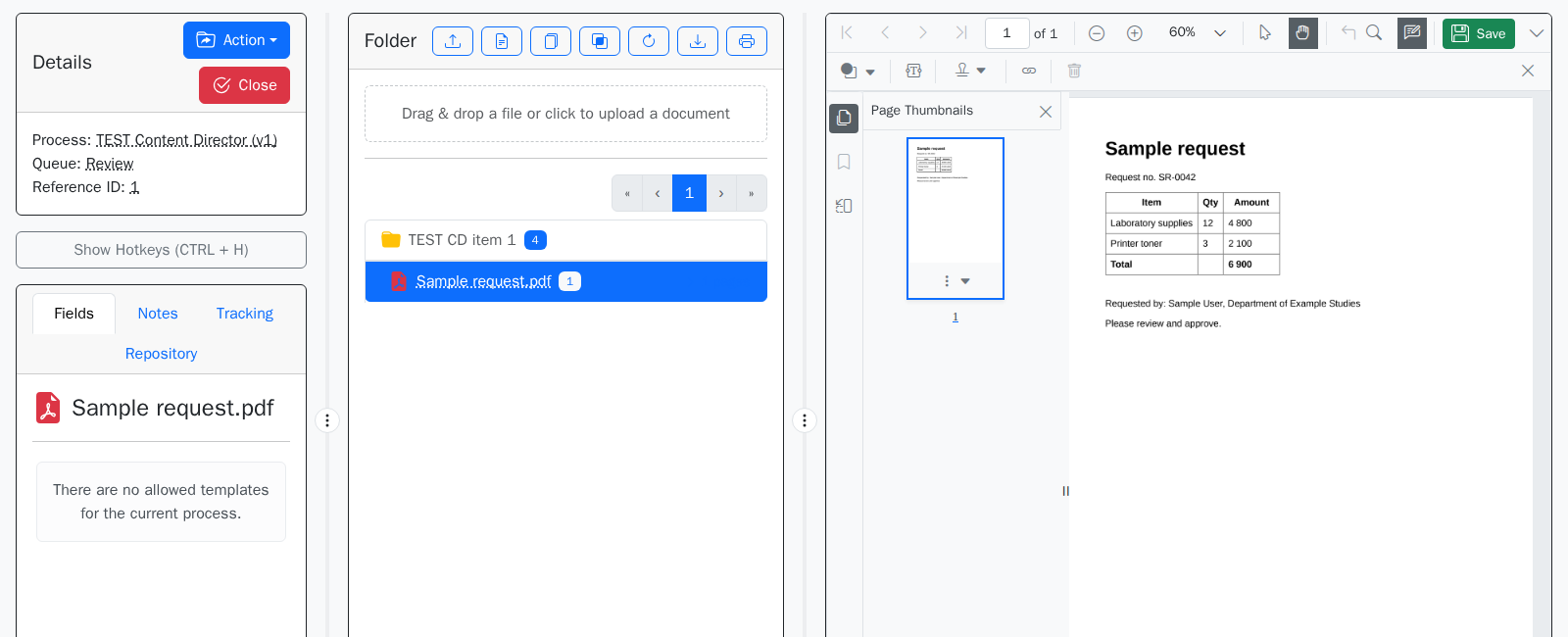
Approvals from the inbox
An Action Message carries the question and one button per choice. The recipient answers without signing in, by email, WhatsApp, Signal, Telegram or SMS; each channel is switched on separately.
Read and edit in place
PDF, Office and image viewers are built in, and Word documents can be viewed and edited in the browser. An item one person is working on is locked to everyone else.
Nothing goes quiet
Reminders and an expiry can be set on each step. Each opened link and confirmed answer is kept with its time and the person’s name.
Cloud or on-premises
Use our secure cloud, or host it on your own servers: Linux with PostgreSQL, with an installation package and guide. If you host it yourself, your data stays on your servers. Load testing was completed at 1,000 users.
Convenient for approvers. Peace of mind for IT.
Only verified people receive action links
Staff enrol their own contact details and confirm them with a code. A contact an administrator enters stays unverified until its owner confirms it.
The workflow server stays behind the firewall
Answers land on a separate relay, in our cloud or on your own server. The suite collects them over a certificate-authenticated connection, so the core system is not exposed to the internet.
A second factor where the decision deserves one
A second factor can be required for an answer, step by step on the process map.
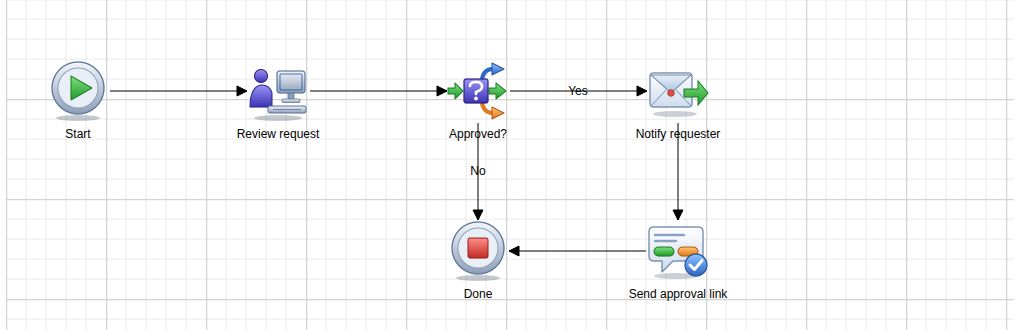
Web Designer and process engine
Process Director
Change a process in a browser, not in a project.
Process Director is two parts that work together. In the Web Designer, the people who own a process draw it as a map, with no desktop software to install.
The process engine then runs the published map: it moves each item from step to step, through queues, inboxes, decisions, rules and timers, sends the messages and keeps the tracking history.
Who it is for: the people who own a process, and the administrators and designers who build and publish it.
Every step you need
From queues and inboxes to SQL and server-script steps for integration, the building blocks are on the palette.
Mistakes caught before go-live
Validate and a Problems pane check the map. A process whose message step has no connected channel cannot be published.
Change without surprises
Build and publish is limited to administrators and designers, with rights on each process and saved versions. Processes export and import as files.
Work that keeps moving
A step on the map sends an Action Message, the recipient picks an answer, and the item is routed. An unanswered request follows its own “Expired” branch.
Steps on the palette
- Queues
- User inboxes
- Decisions
- Rules
- Timers
- Tracking
- Sub-processes
- Archive
- Export
- Convert
- Fax
- SQL
- Server scripts
- Action Messages
Repository and archive
Content Director
Documents and decisions in good order.
Content Director is the repository and archive behind every process. An Archive step files finished work straight into it, and a Repository tab on each work item links back to the document.
Documents in, results out: the Importer/Exporter brings documents in from folders and writes results out. Exports can file into Content Director with tracking, and tracking can be written to your own SQL Server or PostgreSQL database for reporting.
Who it is for: teams that keep an organization’s records, and everyone who needs to find a document and its history later.
Organised and versioned
Cabinets, folders and documents with templates and fields, check-out and check-in, version history and a recycle bin.
Retention periods
Archive status, retention schedules, legal hold, disposition and an event log.
Find the page, not just the file
Field search and OCR full-text search, each enabled separately.
Reliable storage
Stored content is checked against its fingerprint. Rights and sharing are set on each item. S3 or Azure storage is an option.
Document Capture
Intellectus capture tools bring paper into the suite, from the scanner to an indexed, quality-checked batch.
Intellectus iScan
iScan provides single-button scanning of documents that can be identified by document separator sheets using barcode recognition or page count. Scanned images are kept on the local workstation until the scanned batch is approved, allowing the scan operator the flexibility to delete documents or images for re-scan or insert pages that might have been skipped. It includes image compression, extensive file format support, image and thumbnail viewing, image cleanup, TWAIN scanning, OCR and barcode functionality.
Intellectus iDesktop
iDesktop provides a flexible viewing platform for indexing and quality control. Its multiple panels allow users to process an entire batch of documents at one time, providing a speedy and complete imaging desktop. Like iScan, iDesktop is compatible with both ISIS and TWAIN scanners, allowing the deletion and rescan of documents or the addition of missed images or documents to the batch.
One suite, from the inbox to the archive
Start using the Intellectus product suite and watch your business flow with a new level of productivity and control. Contact us today.